
From a two-minute check to a report your audiologist can use.
Swipe through the flow. Two minutes a day give you a clear picture of your child's hearing.
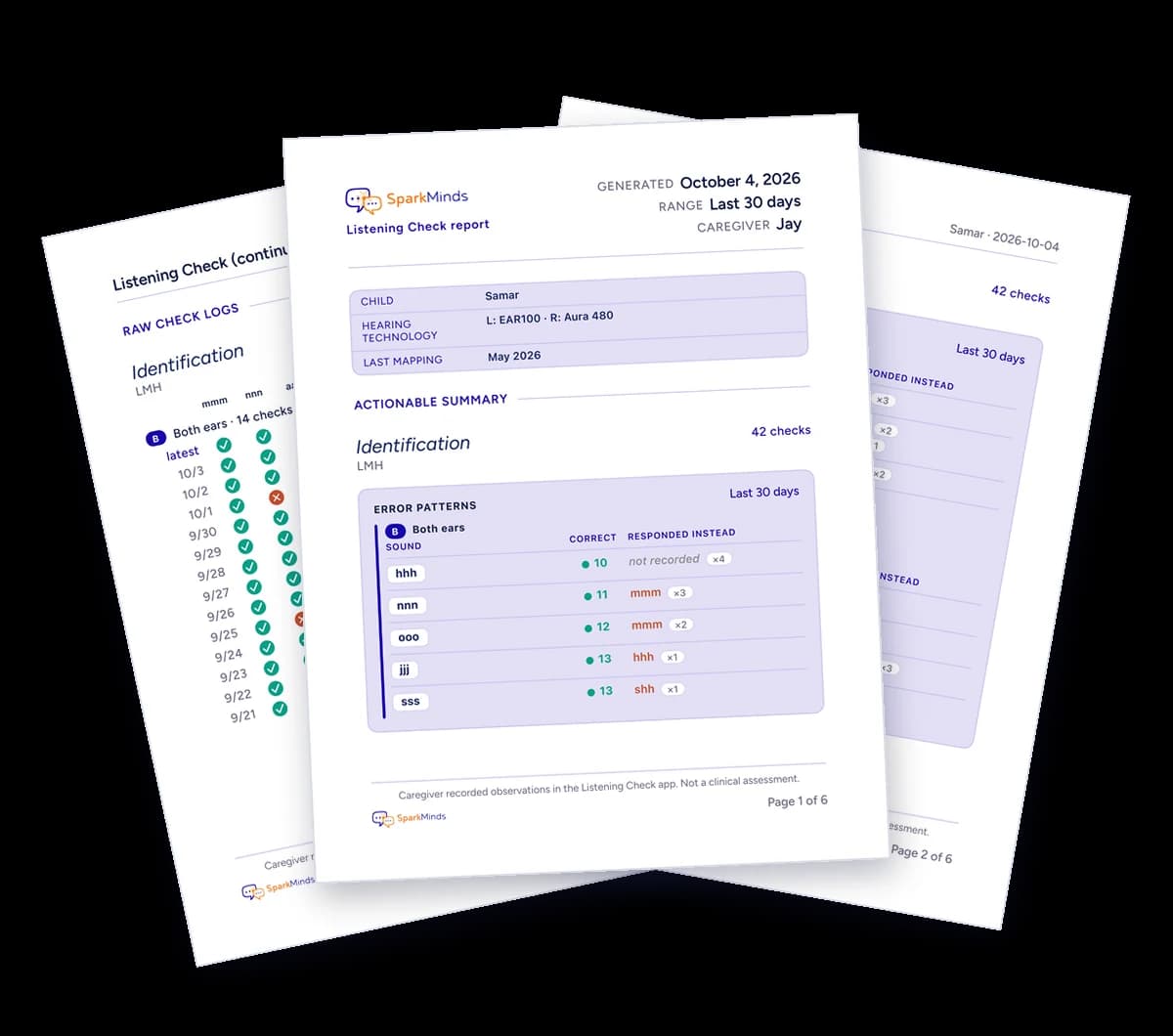
Image description: Three pages of a sample Listening Check report, fanned out on a white background, with page 1 of 6 in front. Its header carries the SparkMinds logo and the title Listening Check report, generated October 4, 2026, covering the last 30 days, caregiver Jay. A panel lists the child, Samar; hearing technology, EAR100 on the left and Aura 480 on the right; and last mapping, May 2026. Under Actionable summary, an LMH Identification section counts 42 checks and shows an Error patterns table for both ears over the last 30 days, giving each sound, how often it was identified correctly and what the child responded instead: hhh, 10 correct, not recorded 4 times; nnn, 11 correct, heard as mmm 3 times; ooo, 12 correct, heard as mmm twice; jjj, 13 correct, heard as hhh once; sss, 13 correct, heard as shh once. The footer reads: Caregiver recorded observations in the Listening Check app. Not a clinical assessment. Behind it on the left, a page of raw check logs lists daily rows from 9/21 to 10/3, mostly green ticks with a few red crosses. Behind it on the right, page 2 continues the error patterns.
A report your audiologist can act on.
You build a history of checks. The app creates a clear report for your audiologist or therapist: error patterns per ear and changes in hearing, so they can fine-tune the programming or mapping of your child's devices.
View the full sample report (PDF)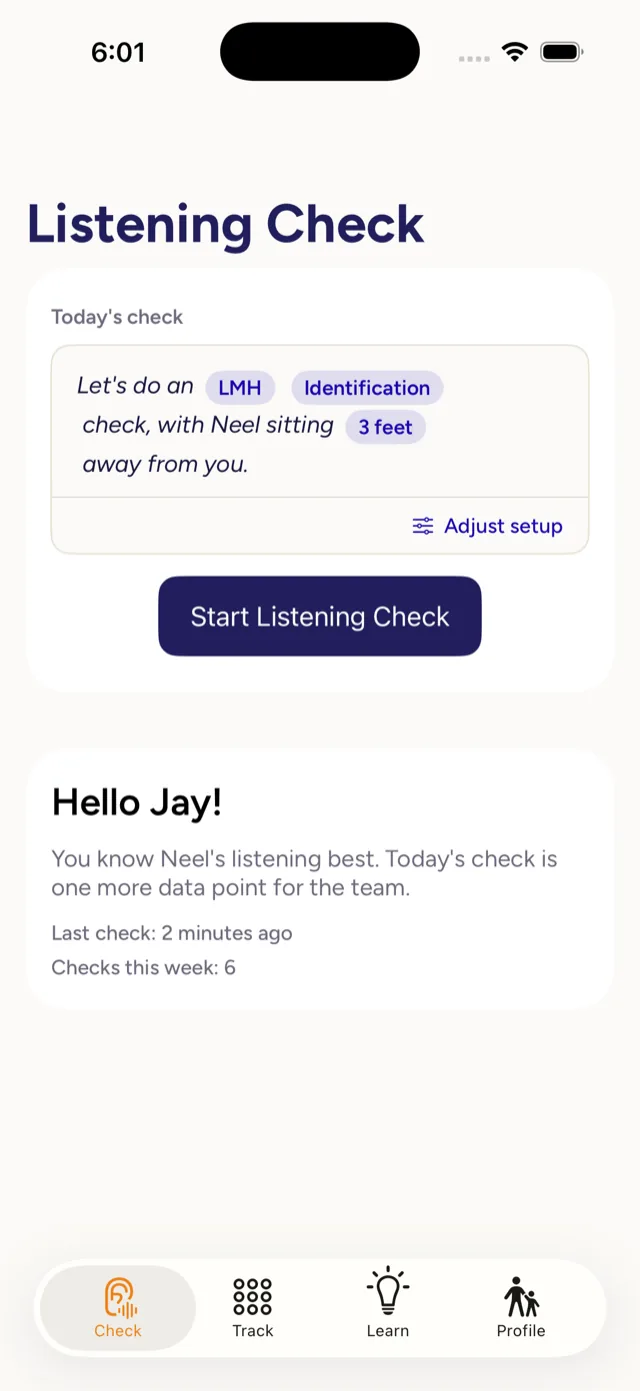
Image description: Phone screenshot of the Listening Check home screen. Under the title Listening Check, a card labelled Today's check reads: Let's do an LMH Identification check, with Neel sitting 3 feet away from you. Below it are an Adjust setup button and a dark blue Start Listening Check button. A second card greets the parent: Hello Jay! One short check. A clearer sense of how Neel is hearing today. Last check: 1 second ago. Checks this week: 3. A tab bar along the bottom shows Check, which is selected, then Track, Learn and Profile.
A check that's ready when you are.
Each day opens with one check, already set up for your child. One tap to begin.
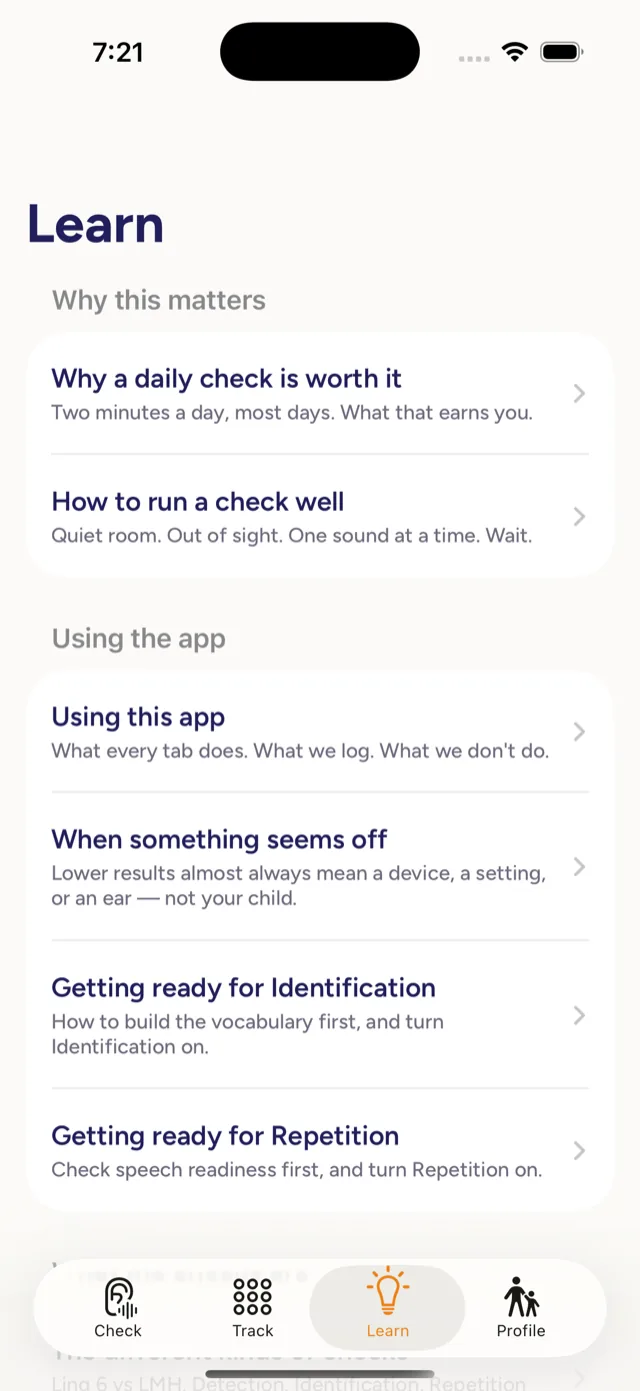
Image description: Phone screenshot of the Learn tab, a list of short lessons, each with a one-line summary. Under Why this matters: Why a daily check is worth it (Two minutes a day, most days. What that earns you.) and How to run a check well (Quiet room. Out of sight. One sound at a time. Wait.). Under Using the app: Using this app (What every tab does. What we log. What we don't do.), When something seems off (Lower results almost always mean a device, a setting, or an ear, not your child.), Getting ready for Identification (How to build the vocabulary first, and turn Identification on.) and Getting ready for Repetition (Check speech readiness first, and turn Repetition on.). Learn is selected in the bottom tab bar.
Learn how to do a listening check.
Plain-English articles on running a good check: quiet room, out of sight, one sound at a time.
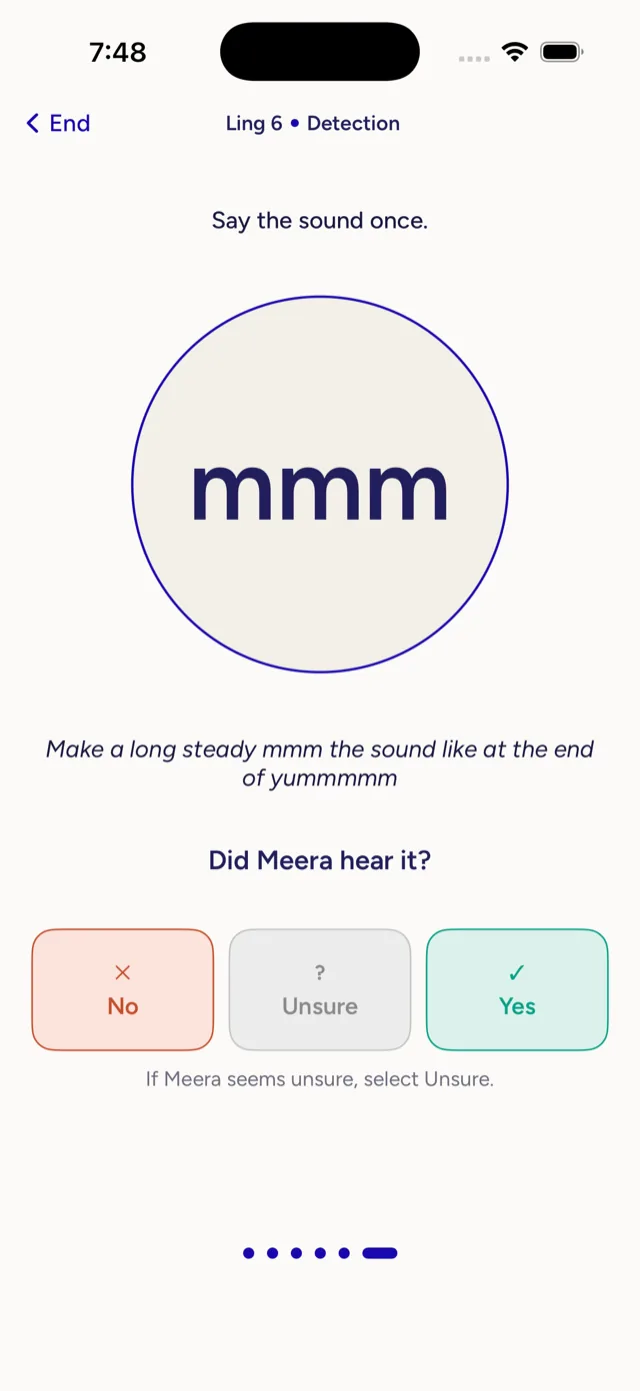
Image description: Phone screenshot of a check in progress. The header reads Ling 6, Detection, with an End button on the left. Below the instruction Say the sound once, a large outlined circle shows the sound mmm, with a tip to make it long and steady, like the end of yummmmm. The question Did Meera hear it? sits above three large buttons: No in red, Unsure in grey and Yes in green. Small text underneath says: If Meera seems unsure, select Unsure. Six dots at the bottom show this is the first of six sounds.
Guided check, one sound at a time.
The app cues each sound and tells you how to make it. You just mark what your child did: heard it, unsure, or not.
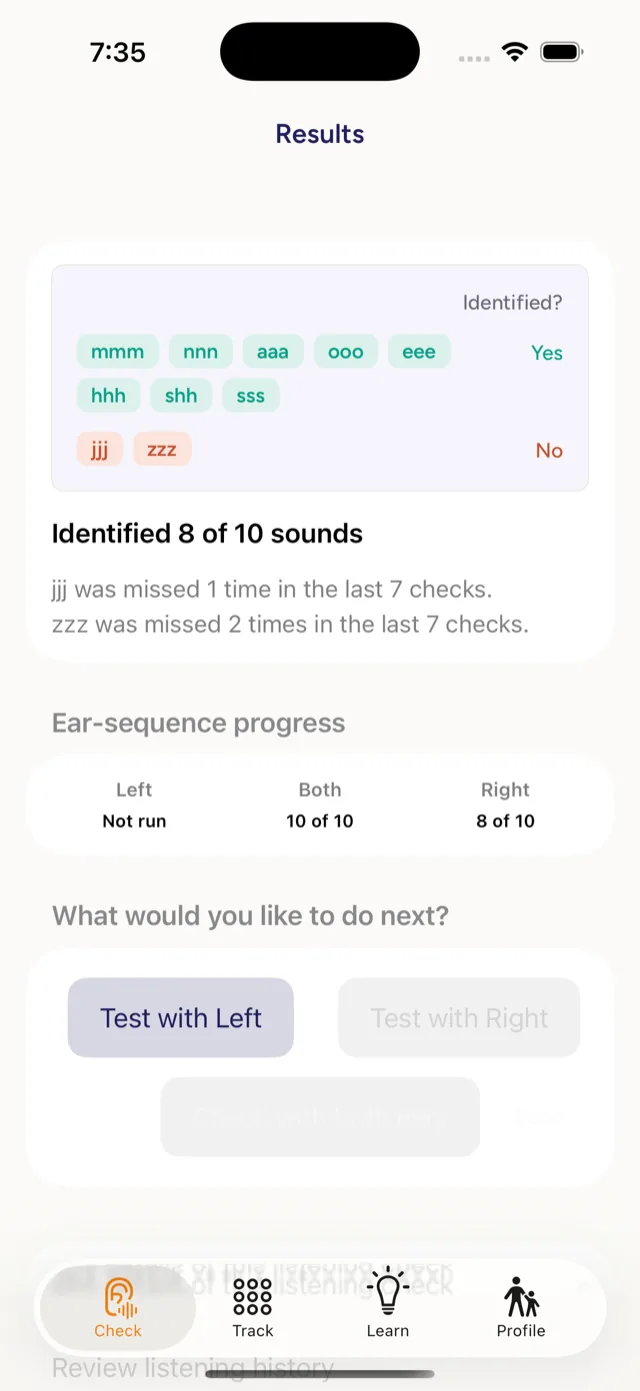
Image description: Phone screenshot of the Results screen after a check. A panel headed Identified? sorts the ten sounds into two rows: eight in green under Yes (mmm, nnn, aaa, ooo, eee, hhh, shh, sss) and two in red under No (jjj, zzz). Beneath it: Identified 8 of 10 sounds. jjj was missed 1 time in the last 7 checks. zzz was missed 2 times in the last 7 checks. An Ear-sequence progress row reads Left: not run, Both: 8 of 10, Right: not run. Under What would you like to do next? are buttons for Test with Left, Test with Right, Check with both ears (greyed out) and Done.
Clear assessment, not a grade.
Every response is logged clearly: which sounds were heard, identified, or repeated. Including ear-by-ear responses.
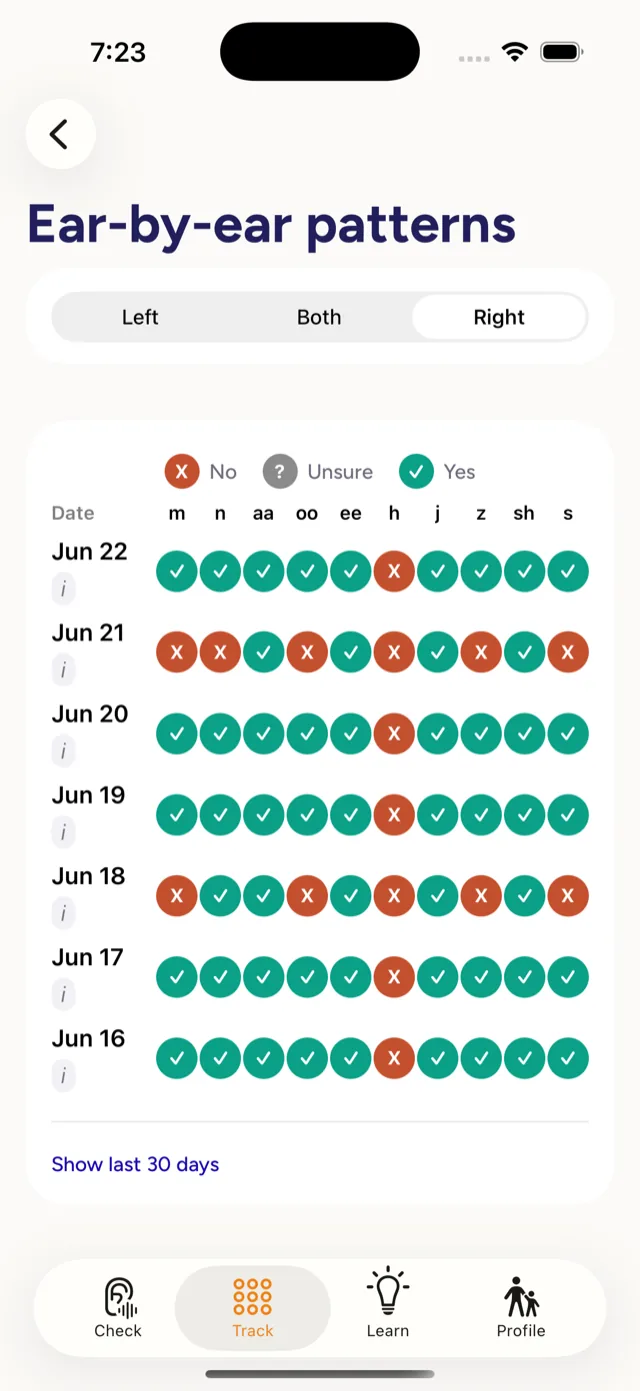
Image description: Phone screenshot of the Ear-by-ear patterns screen in the Track tab. A switch at the top offers Left, Both and Right, with Left selected. A key shows No as a red cross, Unsure as a grey question mark and Yes as a green tick. Below is a grid with one row per day, from Oct 4 at the top back to Sep 28, and one column per sound: m, n, aa, oo, ee, h, j, z, sh and s. Almost every cell is a green tick. There are four red crosses: n on Oct 2, oo on Sep 30 and Sep 29, and m on Sep 28. A link at the bottom reads Show last 30 days.
See the patterns over time.
Daily checks build into a clear ear-by-ear view across days and sounds, so a real change in hearing stands out from an off day.
Image description: Three pages of a sample Listening Check report, fanned out on a white background, with page 1 of 6 in front. Its header carries the SparkMinds logo and the title Listening Check report, generated October 4, 2026, covering the last 30 days, caregiver Jay. A panel lists the child, Samar; hearing technology, EAR100 on the left and Aura 480 on the right; and last mapping, May 2026. Under Actionable summary, an LMH Identification section counts 42 checks and shows an Error patterns table for both ears over the last 30 days, giving each sound, how often it was identified correctly and what the child responded instead: hhh, 10 correct, not recorded 4 times; nnn, 11 correct, heard as mmm 3 times; ooo, 12 correct, heard as mmm twice; jjj, 13 correct, heard as hhh once; sss, 13 correct, heard as shh once. The footer reads: Caregiver recorded observations in the Listening Check app. Not a clinical assessment. Behind it on the left, a page of raw check logs lists daily rows from 9/21 to 10/3, mostly green ticks with a few red crosses. Behind it on the right, page 2 continues the error patterns.
A report your audiologist can act on.
You build a history of checks. The app creates a clear report for your audiologist or therapist: error patterns per ear and changes in hearing, so they can fine-tune the programming or mapping of your child's devices.
View the full sample report (PDF)Image description: Phone screenshot of the Listening Check home screen. Under the title Listening Check, a card labelled Today's check reads: Let's do an LMH Identification check, with Neel sitting 3 feet away from you. Below it are an Adjust setup button and a dark blue Start Listening Check button. A second card greets the parent: Hello Jay! One short check. A clearer sense of how Neel is hearing today. Last check: 1 second ago. Checks this week: 3. A tab bar along the bottom shows Check, which is selected, then Track, Learn and Profile.
A check that's ready when you are.
Each day opens with one check, already set up for your child. One tap to begin.
Know how your child is hearing, in two minutes a day.
Listening Check is opening first to Founding Families. Join and we'll bring you in as we onboard.
An easy way to know how your child is hearing today.
Listening Check is a focused app that helps parents and caregivers run functional listening checks at home and track responses over time. It's designed for families of children using hearing aids and cochlear implants.
A quick, repeatable check you can do at home.
A functional listening check is a short, structured way to see whether your child is hearing functionally today, under a specific listening setup. It is not a hearing test. It brings some honest signal into your week, so you can spot patterns, troubleshoot device days, and have something useful to share with your clinical team when something feels off.
The app teaches you how to administer a check correctly, guides you through it live, logs your child's response in a clean structured way, and helps you compare results across listening conditions over time. The whole flow is designed to fit into a real family day in two to four minutes.
Listening Check is part of the broader SparkMinds ecosystem of tools for DHH families.
Devices fit the ear. Listening happens in real life.
A child can have well-fit hearing devices and still have a hard listening day. Batteries weaken. Tubing clogs. The room is noisier than yesterday. The child is tired. Listening checks help you notice these things in a structured, repeatable way, rather than relying on intuition alone.
Done consistently, a short daily or near-daily check does three things. It builds your confidence as the person who knows your child best. It catches "off" days early, before they become a missed week of language exposure. And it gives your clinical team a clearer view of what's happening between appointments.
The goal is signal, not anxiety. Most days will be fine. The point of doing the check is to make the fine days visible and the off days easier to address.
What a listening check is not
- ✗Not a substitute for clinical audiology or diagnostic hearing tests.
- ✗Not an audiology-grade dB measurement. Consumer phones cannot calibrate the sound your child actually hears.
- ✗Not a daily report card. Some days will be lower. That's normal and not a failure.
- ✗Not a child-facing app. The app guides the adult; the child does the listening.
Be among the first families to use it.
Listening Check launches first for Founding Families. We bring families on gradually so every one gets a tool that's steady and trustworthy from day one.
A note on privacy: Listening Check stores all data on your device. We do not collect, transmit, or sell any personal information from the app. See the app privacy detail for the full description.